




Sul sito http://webdesignledger.com/ ho trovato questi interessanti esempi di flat design... come non amarli?


 Freebie: Flat Design Icons Set Vol1


 UI/UX Flat design – Free PSD – 3 colors


 Freebie PSD: Flat UI Kit


Sul sito http://webdesignledger.com/ ho trovato questi interessanti esempi di flat design... come non amarli?
Freebie: Flat Design Icons Set Vol1
UI/UX Flat design – Free PSD – 3 colors
Pubblicato da LucaRossiFoto in 16 Maggio 2013
https://cavalars.wordpress.com/2013/05/16/flat-design-moda-del-web/
in questo periodo sto cambiando casa, e per una volta tanto ho dovuto assumere io qualcuno che lavorasse per me…
ho dovuto avere a che fare con vari generi di venditori e con varie tipologie di settori, arredo, edilizia, ecc ecc…
beh cosa ho riscontrato da questi mesi di duro lavoro????
che gli italiani fanno le cose con il CULO.
c’è un tasso di incompetenza che neanche in tailandia o in africa ho trovato..
muratori che non sanno mettere le spine, venditori di cucine che per farti preventivo basso(questa è bella mi è successa poco fa) ti “omettono” volutamente ma senza fartelo apparire il frigorifero, giusto un ogettino da pochi euro….
oppure venditori di quei famosi sofà che ti garantiscono al momento della firma che tempi massimi di consegna sono 60 gg (che in tempo di crisi loro sono oberrati di ordini e non riescono a fare prima….incredibile) e invece a pochi giorni dalla scadenza i giorni miracolosamente lievitano a “data da definirsi”….
come se un cliente mi chiede un sito internet pronto per il mese prossimo anzi facciamo tra 60 giorni lavorativi ed io alla data della scadenza al telefono gli rispondo: ” scusa il sito non è pronto, sai sono pieno di lavori per altri e la data della consegna slitta a non so quando” si certo perchè se fosse cosi non voglio vedere come mi pagano….
oppure bella anche questa “salve dovrei ordinare un caminetto quanto ci mettono ad arrivare?”…il venditore “quel modello li noi lo abbiamo in magazzino tempo 7 gg è a casa” e poi passano 45gg prima di vederlo.
un falegname che ti deve fare un armadio e ti fa 2 volte la stessa anta e ti dice per rifarla mi ci vogliono 3 settimane? 3 settimane per un tuo errore???? ed io? PAGO.
ma santo dio, ma come cazzo va il mondo??? io lavoro da freelance e sebbene faccio sempre tutto nei tempi stabiliti senza cannare mai un lavoro, per vedere i 2 spicci che mi spettano devo sudare 7 camice questi sbagliano,ti rubano,ti ingannano da tutte le parti ed io che posso fare per farmi valere?…..
solo pagare e alla svelta se vuoi la roba!
NO COMMENT … sto paese di vecchi ha proprio bisogno di rinnovarsi. ci vorrebbe una bella svolta, altro che Monti e la sua manica di burattini, qua in primis le persone devono imparare a lavorare BENE e SODO !!! siamo indietro anni luce!!!!
Pubblicato da LucaRossiFoto in 23 aprile 2013
https://cavalars.wordpress.com/2013/04/23/tasso-dincompetenza/
Questo è il mio canale (ancora un po) vuoto su thingverse presto pubblicherò altri progetti a cui sto lentamente lavorando…. che la stampa 3d sia con voi maker!
Pubblicato da LucaRossiFoto in 28 marzo 2013
https://cavalars.wordpress.com/2013/03/28/segui-il-mio-canale-su-thingverse-com/

Pubblicato da LucaRossiFoto in 28 febbraio 2013
https://cavalars.wordpress.com/2013/02/28/icona-makerbot-replicator-2/
WordPress is the CMS of choice everywhere right now. No, scratch that! WordPress is the favorite site builder online today.
Why?
With over 70 million websites running on WordPress and almost half of the top 100 blogs using it, there’s no doubt about its popularity.
WordPress currently owns 55% market share for all CMS and it’s often the only option recommended by a large majority of bloggers online.
In fact, if you’re new to online technology you’ll almost be convinced that WordPress is the only option for creating blogs and websites.
The good news is it isn’t!
WordPress is great and has its own VERY BIG market share; it has created solutions and businesses for people online. If you want custom WordPress themes, specialized WordPress Hosting or you want to hirea designer to help you customize your blog, there are countless options.
This article isn’t written to attack WordPress but to make you realize that, while WordPress is great, you don’t necessarily have to use it. There are advantages and disadvantages to using WordPress, but you’re only often reading about the advantages.
It’s important to take note of these disadvantages and consider using an alternative, especially if you’re asmall business that needs a website.
Here are 5 valid reasons you might not want to use WordPress.
The number one disadvantage to using WordPress that most WordPress users aren’t aware of is how vulnerable WordPress can be.
WordPress is open source and relies on a community of developers to come up with the resources you’ll need to customize it; this includes themes and plugins.
Every theme or plugin you use on your WordPress site is written by a different person; since there’s no particular organization/body that monitors WordPress themes or plugins, this mean there could be a bug in the plugin you use on your site.
In case you don’t know this, with WordPress, a single plugin can allow access to your admin dashboard; unless you’re actively taking measures to secure your WordPress blog, then you can’t be totally assured.
Also, WordPress runs on PHP and stores important details in your MYSQL database which leaves a potential for SQL injection attacks. Being vulnerable to brute force attacks is also one major disadvantage of using WordPress, unless you install a plugin to counter this.
No, don’t get me wrong. WordPress is “free”. It’s free to download and install WordPress but having just WordPress is not going to work, unless you don’t want your website to stand out from a large part of the 70+ million websites using WordPress.
You see WordPress everywhere and when you start seeing the same version of a site using WordPress, it becomes less memorable; that’s why WordPress is expensive.
To ensure your WordPress blog is properly designed and always active, you’ll have to spend several thousands of dollars.
Also, with the numerous WordPress updates and changes being rolled out regularly it’s only a matter of time before you start having issues with your “outdated” design and you’ll often have to pay hundreds or thousands of dollars to ensure your WordPress website is active again.
The only way out of this is to be a WordPress designer yourself.
This is designed to be a good thing but when you consider the frequency of WordPress updates and the compatibility issues that come with it (updating plugins etc.) then it’s not necessarily a good thing.
With every update, you risk issues with your website template – which often costs thousands of dollars – and some of your plugins.
Maintenance in WordPress is a whole issue on its own; you can’t use WordPress without constantly updating it and you have to be ready to make changes to your template or plugins when you update.
If you have the budget, a designer or programmer or the resources to manage these updates, WordPress is great. Otherwise, you might want to stick to using other solutions.
For WordPress to be very effective, you’ll often have to install a lot of plugins.
A basic WordPress installation is useless and requires a theme and at least a few plugins to work effectively. On the surface, this isn’t much of a problem but the more WordPress plugins you install the slower your website becomes.
What if you can’t do without these plugins and what if you don’t have the budget or resources for coding these features into your WordPress template? You go for an increasingly slowing website.
In terms of server resources, WordPress also uses a lot more resources than a plain HTML website or a PHP template site so, unless you find a quality WordPress hosting solution, you risk being suspended by your host if you get a lot of visitors and use WordPress on a shared hosting.
It’s important to pay special attention to this unless you already have SEO access.
WordPress is purported to be very SEO friendly but the reality is that almost every open source CMS is. WordPress can easily get you into SEO problems if you don’t have SEO knowledge; a major culprit is the tagging and category system used by WordPress.
Unless you decide to make your tags and categories “noindex”, every single tag you create and every single category you add your content to will have a duplicate form of that content. As a result, some people have 10 versions of the same content and wonder why they’re experiencing the same issue.
If you have advanced SEO knowledge, this won’t be an issue but not everybody possesses this kind of knowledge. Most of the people reading this article probably didn’t know this until today.
While this article contains some valid points, it won’t be complete without listing some quality WordPress alternatives.
Since almost every other CMS has the same issues as WordPress, I will be listing HTML site builders in the alternative sections. Don’t be deceived though, you’ll get quality looking websites with these tools that are built online in a breeze.

One of the best WordPress alternatives available online today, this is tool that provides an HTML site builder and an HTML website editor to help people create better looking websites.
Easy WebContent costs a monthly fee and helps you host your website, your content and everything else. You will also be provided with a WYSIWYG editor and can customize your site to look however you want even if you’re not a designer. There’s also a blog feature if you want a blog as an addon to your website.

Similar to Easy WebContent mentioned above, Wix also has a set of features that allow you to build professional websites that doesn’t rely on WordPress.
The two tools listed above will help you create good looking, WYSIWYG websites without having to rely on WordPress or experience the hassles that come with it.

Tumblr lets you effortlessly share anything. Post text, photos, quotes, links, music, and videos from your browser, phone, desktop, email or wherever you happen to be. You can customize everything, from colors to your theme’s HTML. Tumblr is 100% free, however you can purchase high quality themes if you wish.
Squarespace starts you with beautiful templates right out of the box — each handcrafted by our award-winning design team to make your content stand out. Whether you need simple pages, sophisticated galleries, or a professional blog – it all comes standard with your Squarespace website. If you sign up now, you will get a 14 day free trial.

Share Your Own WordPress Alternatives?
I know there are other WordPress alternatives but the two listed above are the ones I’ve experienced. What other site builder can you recommend as a WordPress alternative? Is there a WordPress disadvantage I failed to mention in this article?
Pubblicato da LucaRossiFoto in 24 gennaio 2013
https://cavalars.wordpress.com/2013/01/24/5-reasons-you-might-not-want-to-use-wordpressfrom-inspirationfeed-com/
è arrivata lo scorso 10 gennaio, ora sto lavorando sui primi progetti! stay tuned!
Pubblicato da LucaRossiFoto in 21 gennaio 2013
https://cavalars.wordpress.com/2013/01/21/stampante-3d-arrivata/
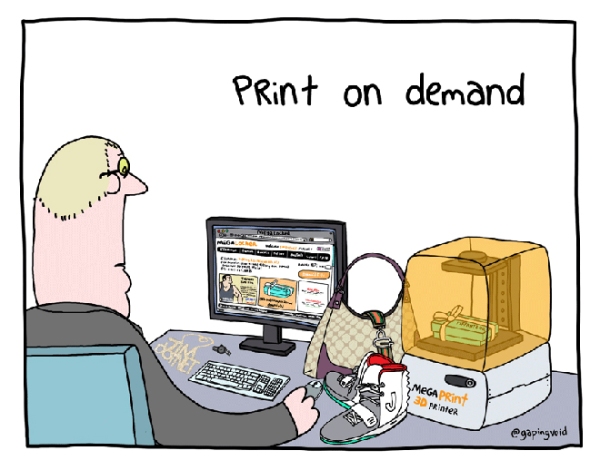
stampa a casa quello che ti serve….
Pubblicato da LucaRossiFoto in 11 dicembre 2012
https://cavalars.wordpress.com/2012/12/11/il-futuro-sara-questo/
One of the best contests each year is the National Geographic Photography Contest. They always receive so many photographic entries that are simply amazing shot from locations all over the world. I picked out a few of my favorites to share here along with the links to go see more.
Photographers of all skill levels participate in the National Geographic Photo Contest each year submitting over 15,000 photos across three different categories, Nature, People and Places. The photographs are judged on creativity and photographic quality by a panel of experts. There is one first place winner in each category and a grand prize winner as well. You can go see all the entries right now on the National Geographic Photo Contest Website.
 Photo and caption by Bjorn Olesen – It had been an unusually quiet morning in the montane pine and fern forest close to the Borneo Highland Resort in Sarawak, Malaysia. I was about to pack my bags I hear this juvenile Spectacled Spiderhunter (Arachnothera flavigaster) calling chi-chit chi-chit trying to attract the attention of its parents above while flapping its wings. But the parents ignored it, and the it flew away – and I did not see it again.
 Photo and caption by Money Sharma – Govinda players gather together under Dahi Handi to making a human pyramid to catch and then break an earthen pot high in the air with the help of a rope, in order to win the set prizes. — Janmashtami and Dahi Haandi was celebrated in Mumbai. Govindas (young men) form a human pyramid to reach the dahi handi and try to break it in a bid to win prizes.

Photo and caption by John Peterson – After observing this turtle, I swam with him for a few minutes.

Photo and caption by Mark Bridger – This is Gandalf the Great Grey Owl and he gets scared flying out in the open so his owners have built his aviary inside a brick shed. He now loves spending his days watching the world go by out of his window.

Photo and caption by Peng Jiang – The shoal is one of the most fascinating places in Xiapu, China. Fishermen farm fish, shrimp, and oysters and plant seaweed along this coast area.

Photo and caption by Fabien BRAVIN – A tiny mantis larva in an american poppy flower.

Photo and caption by Mandy Wilson – Beautiful Lucky Bay in Esperance, Western Australia is home to many kangaroos. Not only is the turquoise water and white sand a sight to see but at sunset the kangaroos bounce their way across the sand looking for dinner.

Photo and caption by Bill Thoet – This is the third shot with a flash, waking all of the bats up and having them all stare at the camera.

Photo and caption by Janez Tolar – Jamnik, small village in Slovenia. One morning in in autumn, fog was just in the right height at the right time. The atmosphere was heavenly, unforgettable.

Photo and caption by Mark Meyer – Hikers under the Mendenhall Glacier near Juneau, Alaska. When conditions are right, streams melt holes into the glacier. At times they are large and stable enough for exploration. The ice filters out most colors of light except for the blue wavelengths leaving a stunning blue glowing from the ice above.

Photo and caption by Chang Ming Chih – The fishers catched fish in the night. They use the fire that made fish close the boat and got them.
 Photo and caption by Agne Subelyte – I took this picture while I was in an aerial cableway going down from the Mt Pilatus in Central Switzerland. It was the end of a nice day spent hiking, including a stop by the beautiful little white chapel on Klimsenhorn on the way to the top.
[Via This is Colossal]
Pubblicato da LucaRossiFoto in 6 dicembre 2012
https://cavalars.wordpress.com/2012/12/06/fantastiche-foto-del-concorso-ng-_/
venerdi non ho resistito e ho preso farcry3.


Pubblicato da LucaRossiFoto in 3 dicembre 2012
https://cavalars.wordpress.com/2012/12/03/2435/
If you like my art and you like to give me more chance to develop new project please help me!


 Cavalars
Devi effettuare l'accesso per postare un commento.